
Key facts
- Manuals
- 4
- Models
- 1
- Languages
- EN · ZH
- Last added
- 2023-10-16
CRI models by category
Featured CRI manuals
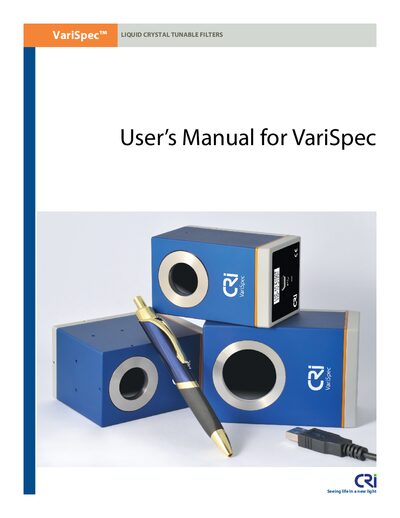
CRi VariSpec Liquid Crystal Tunable Filter User Manual
This manual introduces the CRi VariSpec family of liquid crystal tunable filters, describing their hardware components, safety considerations, and regulatory certifications. It explains how to unpack, install the software, connect the filter (including USB and optional cables), and configure the device using the provided SDK and VsGui program.
Subsequent chapters cover command‑based control of the filters, programming examples for wavelength tuning, detailed system specifications, mechanical dimensions, and a comprehensive FAQ with troubleshooting tips. Appendices list technical specifications, operating considerations, legacy hardware information, and the end‑user license agreement.
Covers: Introduction to VariSpec Liquid Crystal Tunable Filters · Setting Up a VariSpec Filter · Controlling VariSpec Filters · Frequently Asked Questions & Troubleshooting · System Specifications & Dimensions · Operator and Equipment Safety
CRI Dual-CS Coder Plug-in CS4 User Manual
This manual describes the CRI Dual‑CS Coder Plug‑in, a video and audio encoding add‑on for Adobe Premiere Pro CS4 and Adobe Media Encoder CS4. It lists the supported operating systems (Windows XP 32‑bit and Windows Vista 32‑bit), the required file locations, and the steps to install and configure the plug‑in.
The document also covers export settings, supported codecs (MPEG‑2, H.264, MP4 with AAC audio), and provides a troubleshooting section with common license and certification errors and their resolutions.
Covers: Installation · Supported Platforms · File Locations · Export Settings · Supported Codecs · Troubleshooting
CRI Dual-CS Coder Plug-in CS3 User Manual
The CRI Dual‑CS Coder Plug‑in CS3 is a software codec that works with Adobe Premiere Pro CS3 and Premiere Elements 7 on Windows XP and Windows Vista (32‑bit). It enables high‑speed encoding of MPEG‑2 and H.264 video into MP4 files (H.264 + AAC audio).
The manual explains how to install the plug‑in via the provided installer or manual copy, activate it under Windows Vista UAC settings, configure export settings, and troubleshoot common activation and licensing errors. This manual is written in Chinese.
Covers: Overview · Installation · Workflow · Settings · Troubleshooting · FAQ
CRI Dual-CS Coder Plug-in CS4 Owner's Manual
This manual provides an overview of the CRI Dual‑CS Coder plug‑in for Adobe Premiere Pro CS4, including installation steps, supported video formats, and export settings. It also covers licensing information and troubleshooting common errors.
The document lists required system configurations, file locations for presets on Windows XP and Vista, and detailed instructions for using the plug‑in within Adobe Media Encoder and Premiere Pro.
Covers: Introduction · Installation · Supported Formats · Export Settings · License and Certification · Troubleshooting
Latest CRI manuals
CRi VariSpec Liquid Crystal Tunable Filter User Manual
User Manual 66 pages · 5.5 MB · ENThe CRi VariSpec User Manual provides setup, operation, and troubleshooting guidance for the VariSpec liquid crystal tunable filters.
CRI Dual-CS Coder Plug-in CS4 User Manual
User Manual 26 pages · 639 KB · ENThe CRI Dual‑CS Coder Plug‑in for Adobe Premiere Pro CS4 user manual provides installation, usage, and troubleshooting instructions.
CRI Dual-CS Coder Plug-in CS3 User Manual
User Manual 30 pages · 717 KB · ZHThe CRI Dual‑CS Coder Plug‑in CS3 user manual provides installation, configuration and usage instructions for encoding MPEG‑2 and H.264 video with Adobe…
CRI Dual-CS Coder Plug-in CS4 Owner's Manual
User Manual 26 pages · 647 KB · ENUser manual for the CRI Dual‑CS Coder plug‑in for Adobe Premiere Pro CS4.
Which document do I need?
User Manual
Day-to-day operation, settings and troubleshooting. Start here if the product is already set up.
Questions answered in CRI manuals
How is the VariSpec filter powered and connected?
All VariSpec filters draw power from and are controlled by the USB connector of a host computer.
From: CRi VariSpec Liquid Crystal Tunable Filter User Manual
What safety precautions should be followed when handling the filter?
Do not expose the optics module to heat above 40 °C, drop it, intense laser light, liquids, or explosive gases; use only supplied cables and a properly grounded host computer.
From: CRi VariSpec Liquid Crystal Tunable Filter User Manual
Which operating systems are supported by the CRI Dual‑CS Coder Plug‑in?
The plug‑in works on Windows XP (32‑bit) and Windows Vista (32‑bit).
Where are the plug‑in configuration files installed?
Configuration files are located under the Adobe program folder, e.g., C:\Program Files\Adobe\Common\Plug‑ins\CS4\MediaCore\cri\CriDualCS_CS4.cfg.
What does the error “LEAPS. Failed in the socket creation with the server.” mean?
It usually indicates that the LAN is not connected properly or the PC lacks correct network settings.
What does the message “LEAPS: No license for or illegal certification key” indicate?
The product’s serial number is likely invalid or missing.