
Key facts
- Manuals
- 1
- Languages
- ZH
- Last added
- 2012-03-12
Featured CERS25PCI manuals
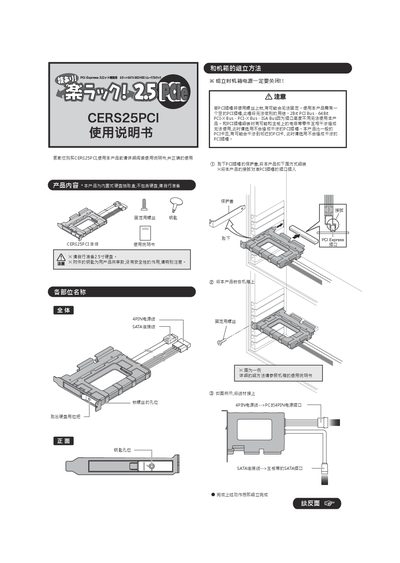
CERS CERS25PCI Installation Guide
This guide provides step‑by‑step instructions for installing the CERS25PCI PCI card in a computer chassis. It includes safety precautions, connector descriptions, and proper mounting techniques to avoid interference with other PCI slots.
The document also describes removal procedures, recommended operating temperature range, and physical dimensions of the card, ensuring reliable integration with the host system. This manual is written in Chinese.
Covers: Safety Precautions · Installation Procedure · Connector Pinout · Removal Procedure · Physical Dimensions · Operating Temperature
Latest CERS25PCI manuals
CERS CERS25PCI Installation Guide
Installation Guide 2 pages · 771 KB · ZHInstallation guide for the CERS25PCI PCI card, covering connector pinout, mounting steps, and safety notes.
Which document do I need?
Installation Guide
Mounting, wiring and first power-up. Read it before the hardware goes in.
Questions answered in CERS25PCI manuals
What temperature range can the CERS25PCI operate in?
It is rated for operation between 5 °C and 35 °C.
How do I install the CERS25PCI into a chassis?
Mount the card using the provided screws, align the 4‑pin and SATA connectors with the corresponding slots on the motherboard, and secure it firmly without interfering with other PCI slots.