
Key facts
- Manuals
- 1
- Languages
- ZH
- Last added
- 2012-03-12
Featured AUTOID manuals
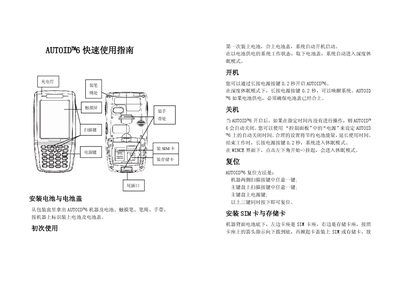
SEUIC AUTOID n6 Quick Start Guide
This guide provides step‑by‑step instructions for getting the AUTOID n6 ready for use. It explains how to install the battery, attach the battery cover, insert the SIM and storage cards, and remove the protective film from the touch screen.
It also describes how to power the device on and off, enter deep‑sleep mode, reset the unit, and charge it either via the base station or the tail‑plug cable, with LED indicators showing charging status. This manual is written in Chinese.
Covers: Charging Light · Pen Installation · Touch Screen · Scan Key · SIM Card Installation · Battery Installation
Latest AUTOID manuals
SEUIC AUTOID n6 Quick Start Guide
Quick Start Guide 2 pages · 214 KB · ZHQuick start guide for the SEUIC AUTOID n6 handheld device, covering setup, power, SIM and storage card installation, and charging.
Which document do I need?
Quick Start Guide
The shortest path to a working setup, usually only a few pages.
Questions answered in AUTOID manuals
How do I turn on the AUTOID n6?
Press and hold the power button for about 0.2 seconds.
How can I charge the AUTOID n6?
Charge via the base station or the tail‑plug cable; a red LED shows charging and a green LED indicates the battery is full.