
Key facts
- Manuals
- 1
- Languages
- ZH
- Last added
- 2011-12-16
Featured AOCTUA manuals
Noctua NH-U12DX 1366 Installation Guide
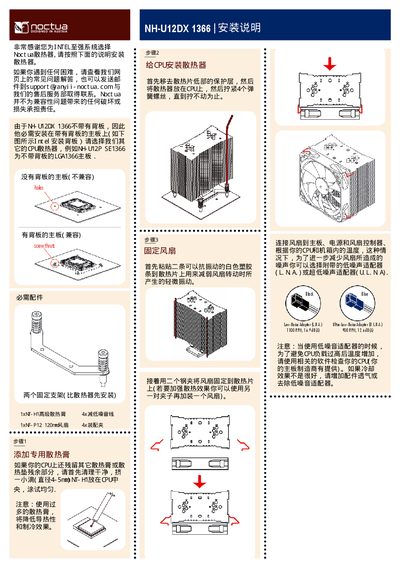
This guide explains how to install the Noctua NH-U12DX 1366 cooler. The cooler does not have a backplate and must be mounted on a motherboard that provides a backplate, such as Intel LGA1366 boards with a backplate.
The manual details the mounting process, including bracket installation, securing the cooler to the CPU, and optional low‑noise adapters (LNA or ULNA) to reduce acoustic emissions. It also provides troubleshooting tips and contact information for support. This manual is written in Chinese.
Covers: Installation Overview · Compatibility (Backplate Requirement) · Mounting Brackets Installation · CPU Cooler Mounting Procedure · Low‑Noise Adapter Options · Troubleshooting and Support
Latest AOCTUA manuals
Noctua NH-U12DX 1366 Installation Guide
Installation Guide 1 pages · 315 KB · ZHInstallation guide for the Noctua NH-U12DX 1366 CPU cooler, covering compatibility, mounting steps, and low‑noise options.
Which document do I need?
Installation Guide
Mounting, wiring and first power-up. Read it before the hardware goes in.
Questions answered in AOCTUA manuals
Is the NH-U12DX 1366 compatible with motherboards without a backplate?
No, the cooler requires a motherboard that has a backplate.