
Key facts
- Manuals
- 1
- Languages
- ZH
- Last added
- 2012-03-13
Featured AB61284C manuals
AB AB61284C Movement User Manual
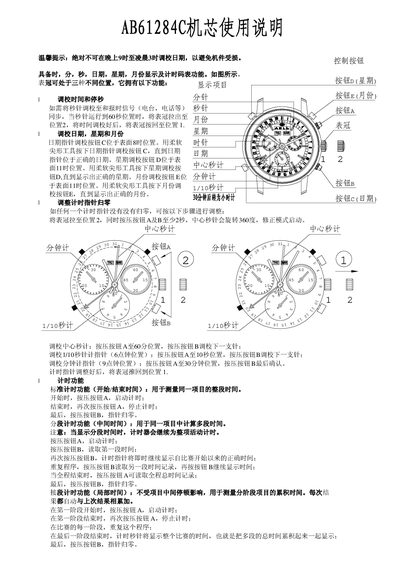
This manual describes the operation of the AB61284C movement, including its hour, minute, second, date, weekday and month displays, as well as the functions of the five control buttons. It provides step‑by‑step instructions for adjusting time, date, weekday and month, and warns against adjusting the date between 9 PM and 3 AM to prevent damage.
The document also details the timing functions: standard start/stop timing, split‑time measurement, and cumulative timing for multi‑stage activities. Instructions cover how to reset timing pointers, how to use buttons A and B for starting, stopping, reading and zeroing the timers, and how to adjust the timing pointers when they do not return to zero automatically. This manual is written in Chinese.
Covers: Control Buttons · Time Adjustment · Date Adjustment · Weekday Adjustment · Month Adjustment · Standard Timing Function
Latest AB61284C manuals
AB AB61284C Movement User Manual
User Manual 1 pages · 176 KB · ZHThe AB AB61284C movement user manual explains button functions, time/date adjustments, and timing features.
Which document do I need?
User Manual
Day-to-day operation, settings and troubleshooting. Start here if the product is already set up.
Questions answered in AB61284C manuals
When should I not adjust the date?
Never adjust the date between 9 PM and 3 AM to avoid damage to the movement.
How do I reset the timing pointers if they do not return to zero?
Pull the crown to position 2, press buttons A and B for at least 2 seconds, then push the crown back to position 1.