
Key facts
- Manuals
- 1
- Languages
- ZH
- Last added
- 2026-09-29
Featured 本视科技 manuals
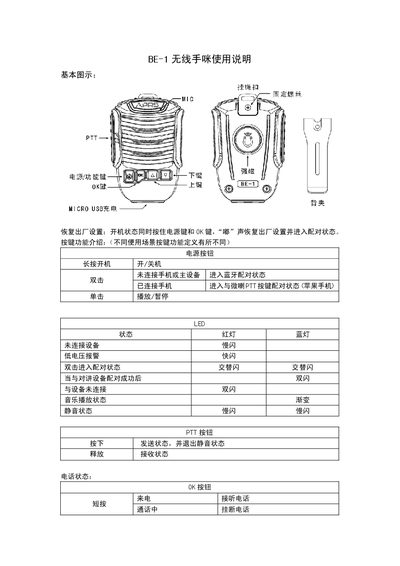
Benshi BE-1 Wireless Handheld Microphone User Manual
This manual provides step‑by‑step instructions for using the BE‑1 wireless handheld microphone. It covers factory reset, button functions, how to connect the device to radios and smartphones, charging procedures, mounting options, and firmware upgrades.
Safety notes and usage tips are included, such as the effective communication distance of less than 10 m, battery protection, and outdoor water‑resistance precautions. The document also details the pairing process with both Android and iOS devices and with various radio units. This manual is written in Chinese.
Covers: Factory Reset · Button Functions · Connecting to Radio · Connecting to Phone · Charging · Mounting Options
Latest 本视科技 manuals
Benshi BE-1 Wireless Handheld Microphone User Manual
User Manual 3 pages · 145 KB · ZHThe Benshi BE-1 wireless handheld microphone user manual explains setup, pairing, charging, operation, and safety guidelines.
Which document do I need?
User Manual
Day-to-day operation, settings and troubleshooting. Start here if the product is already set up.
Questions answered in 本视科技 manuals
How do I reset the BE-1 to factory settings?
Turn the device on and hold the power button and OK button together; a beep indicates the factory reset and the device enters pairing mode.
What charging requirements does the BE-1 have?
Charge the BE-1 via its micro‑USB port using a 5 V, 1 A (or higher) power adapter.