
Key facts
- Manuals
- 1
- Languages
- ZH
- Last added
- 2026-09-29
Featured Jingchuang manuals
Jingchuang STC-9200 Temperature Controller User Manual
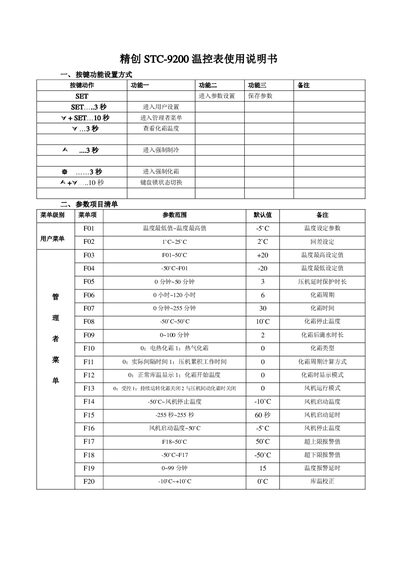
This manual describes the button actions for the STC-9200 temperature controller, including how to enter user settings, administrator menus, view defrost temperature, and toggle the keyboard lock. Each button press duration (e.g., SET for 3 seconds) triggers a specific function.
The document also provides a complete list of configurable parameters for both the user and administrator menus, covering temperature limits, hysteresis, defrost cycle and time, fan operation modes, and alarm thresholds. Default values and allowable ranges are listed for each setting. This manual is written in Chinese.
Covers: Key Function Settings · Parameter List · User Menu Parameters · Administrator Menu Parameters · Fan Operation Settings · Defrost Cycle Settings
Latest Jingchuang manuals
Jingchuang STC-9200 Temperature Controller User Manual
User Manual 1 pages · 137 KB · ZHThe Jingchuang STC-9200 Temperature Controller User Manual explains key functions, parameter settings, and menu options.
Which document do I need?
User Manual
Day-to-day operation, settings and troubleshooting. Start here if the product is already set up.
Questions answered in Jingchuang manuals
How do I enter user settings?
Press the SET button for 3 seconds to enter user settings.
From: Jingchuang STC-9200 Temperature Controller User Manual
How do I access the administrator menu?
Press the SET button for 10 seconds to open the administrator menu.
From: Jingchuang STC-9200 Temperature Controller User Manual