
Key facts
- Manuals
- 1
- Languages
- ZH
- Last added
- 2026-09-28
Featured 嘉穎科技 manuals
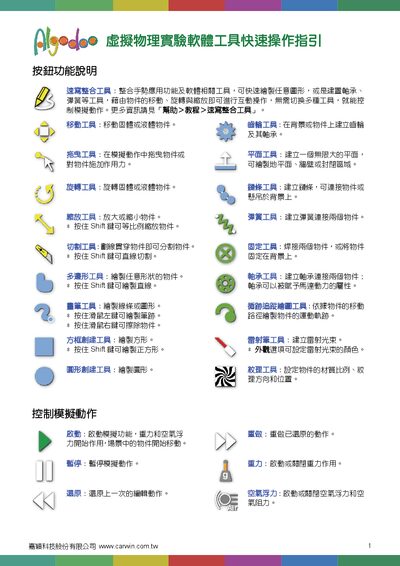
Jia Ying Technology Virtual Physics Experiment Software Quick Operation Guide
The document describes each tool available in the virtual physics experiment software, such as the Move, Gear, Drag, Plane, Rotate, Chain, Scale, Spring, Cut, Fixed, Polygon, Bearing, Brush, Trace, Box, Laser, Circle, and Texture tools, and explains how to use them for interactive simulations.
It also includes step‑by‑step example scenarios—building a car, constructing a water tank, and dragging a box on a plane—showing how to create objects, assign properties, start, pause, and reset the simulation, and observe physical behaviors. This manual is written in Chinese.
Covers: Button Functions · Simulation Controls · Creating a Car · Creating a Water Tank · Dragging a Box on a Plane
Latest 嘉穎科技 manuals
Jia Ying Technology Virtual Physics Experiment Software Quick Operation Guide
Quick Start Guide 4 pages · 941 KB · ZHThis guide provides quick instructions for using the Virtual Physics Experiment Software tool, covering button functions and example experiments.
Which document do I need?
Quick Start Guide
The shortest path to a working setup, usually only a few pages.
Questions answered in 嘉穎科技 manuals
How do I start the simulation?
Press the "啟動" (Start) button to begin the simulation.
From: Jia Ying Technology Virtual Physics Experiment Software Quick Operation Guide
How can I pause the simulation?
Press the "暫停" (Pause) button to pause the simulation.
From: Jia Ying Technology Virtual Physics Experiment Software Quick Operation Guide