
Key facts
- Manuals
- 1
- Languages
- ZH
- Last added
- 2026-09-28
Featured GDCA manuals
GDCA Digital Certificate User Manual
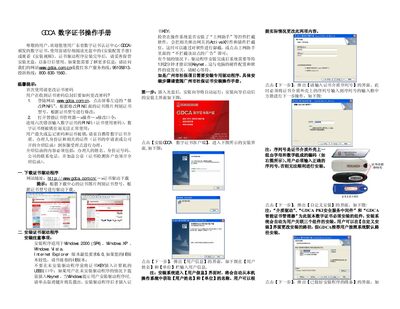
The manual guides users through downloading and installing the GDCA digital certificate driver on Windows systems, configuring the certificate password, and setting trusted sites in Internet Explorer. Detailed step‑by‑step screens show how to insert the USB key, run the installation wizard, and verify successful installation.
A FAQ section addresses common issues such as lost certificates, expired certificates, and hardware detection errors, providing contact numbers for GDCA support and instructions for resolving each problem. This manual is written in Chinese.
Covers: Driver Download · Driver Installation · Certificate Password Change · Trusted Site Settings · FAQ
Latest GDCA manuals
GDCA Digital Certificate User Manual
User Manual 2 pages · 196 KB · ZHThis GDCA Digital Certificate User Manual explains driver installation, password changes, troubleshooting and contact information.
Which document do I need?
User Manual
Day-to-day operation, settings and troubleshooting. Start here if the product is already set up.
Questions answered in GDCA manuals
What should I do if my digital certificate is lost?
Visit a GDCA service point, pay the medium fee, and bring the required documents to have the certificate reissued.
Why does the system show a "user certificate name error"?
The certificate has expired and must be renewed at a GDCA service point.