
Key facts
- Manuals
- 2
- Languages
- EN
- Last added
- 2026-09-28
Featured Nexcom manuals
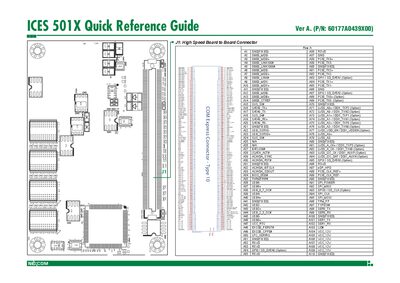
Nexcom ICES 501X Quick Reference Guide
This Quick Reference Guide for the Nexcom ICES 501X board lists all connector pins, signal definitions and component locations. It is intended for engineers and technicians who need a concise reference while designing or troubleshooting the system.
The guide includes separate sections for Row A and Row B pin assignments, a full pin‑signal table, and notes on optional signals. It also provides the part number and version information, and points to the Nexcom website for future updates.
Covers: Row A Pin Assignments · Row B Pin Assignments · Pin Signal Table · Connector Overview · Reference Information
NEXCOM APPC 1220T/1221T/1520T/1521T/1720T/1721T Panel PC User Manual
This manual introduces the APPC series of industrial panel PCs, detailing specifications such as a 15‑inch LED display, Intel Atom D525 processor, up to 2 GB DDR3 memory, and optional I/O like CAN bus, GPIO, and dual Ethernet ports. It also describes the mechanical dimensions, mounting options, and environmental ratings (IP65 front).
The guide covers installation steps, system setup procedures for SATA drives, CompactFlash, and Mini‑PCIe modules, as well as BIOS configuration. Safety precautions, warranty terms, RMA procedures, and regulatory compliance (FCC, CE, RoHS) are included to ensure proper use and maintenance.
Covers: Product Introduction · Jumpers and Connectors · System Setup · BIOS Setup · Watchdog Timer Programming Guide · GPIO Programming Guide
Latest Nexcom manuals
Nexcom ICES 501X Quick Reference Guide
Quick Start Guide 3 pages · 876 KB · ENThe Nexcom ICES 501X Quick Reference Guide provides pinout, connector and component placement details for the board.
NEXCOM APPC 1220T/1221T/1520T/1521T/1720T/1721T Panel PC User Manual
User Manual 110 pages · 2.3 MB · ENThe NEXCOM APPC 1220T/1221T/1520T/1521T/1720T/1721T Panel PC User Manual provides product overview, installation, BIOS setup, and safety information.
Which document do I need?
Quick Start Guide
The shortest path to a working setup, usually only a few pages.
User Manual
Day-to-day operation, settings and troubleshooting. Start here if the product is already set up.
Questions answered in Nexcom manuals
Where can I get updates for the ICES 501X Quick Reference Guide?
Updates are available on the Nexcom website at www.nexcom.com.
What is the part number of the ICES 501X board?
The part number is 60177A0439X00.
What safety precautions should be taken before cleaning the device?
Disconnect the equipment from any AC outlet and use a damp cloth; do not use liquid or spray detergents.
From: NEXCOM APPC 1220T/1221T/1520T/1521T/1720T/1721T Panel PC User Manual
How can the watchdog timer be programmed?
The watchdog timeout can be programmed by software from 1 second to 255 seconds or from 1 minute to 255 minutes.
From: NEXCOM APPC 1220T/1221T/1520T/1521T/1720T/1721T Panel PC User Manual