
Key facts
- Manuals
- 1
- Languages
- EN
- Last added
- 2026-09-29
Featured MOOD manuals
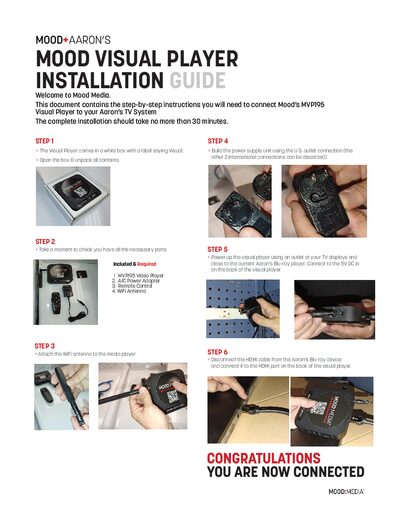
Mood MVP195 Visual Player Installation Guide
This guide provides the instructions needed to connect Mood’s MVP195 Visual Player to an Aaron’s TV system. It lists the required components and outlines each installation step.
The installation process takes up to 30 minutes and includes unpacking, verifying parts, attaching the Wi‑Fi antenna, building the power supply, powering up the player, and connecting the HDMI cable to the TV.
Covers: Included & Required · Step 1: Unpack · Step 2: Verify Parts · Step 3: Attach WiFi Antenna · Step 4: Build Power Supply · Step 5: Power Up
Latest MOOD manuals
Mood MVP195 Visual Player Installation Guide
Installation Guide 1 pages · 46.9 MB · ENStep-by-step guide to install the Mood MVP195 Visual Player with an Aaron’s TV system.
Which document do I need?
Installation Guide
Mounting, wiring and first power-up. Read it before the hardware goes in.
Questions answered in MOOD manuals
What components are required for installation?
You need the MVP195 Video Player, an A/C Power Adapter, a Remote Control, and a Wi‑Fi Antenna.
How long does the installation take?
The installation should take no more than 30 minutes.