
Key facts
- Manuals
- 1
- Languages
- ZH
- Last added
- 2026-09-28
Featured AX manuals
AX AX-17 Automatic Controller User Manual
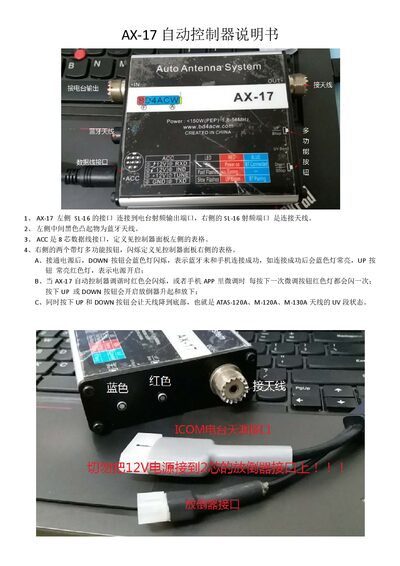
The manual describes the hardware layout of the AX-17 controller, including the SL‑16 RF ports, Bluetooth antenna, ACC data‑line connector, and multifunction indicator buttons. It explains the meaning of the LED indicators for power, Bluetooth connection, and tuning status.
It also covers the data‑cable interfaces (4‑pin for ICOM radio tuner, 2‑pin for antenna actuator), safety precautions for power polarity and short‑circuit protection, and the companion mobile app functions such as Bluetooth pairing, tuning commands, and UV‑segment control. This manual is written in Chinese.
Covers: Hardware Connections · Indicator Lights · Data Cable Interfaces · Safety Precautions · App Operation · Button Functions
Latest AX manuals
AX AX-17 Automatic Controller User Manual
User Manual 3 pages · 431 KB · ZHThe AX-17 automatic controller manual explains connections, functions, operation steps, safety warnings, and app usage for antenna tuning.
Which document do I need?
User Manual
Day-to-day operation, settings and troubleshooting. Start here if the product is already set up.
Questions answered in AX manuals
What does the DOWN button indicate when the controller is powered on?
When the controller is powered on, the DOWN button flashes a blue light to show that Bluetooth has not yet connected to the phone; once connected, the blue light stays solid.
How should the 4‑pin data cable be connected?
The 4‑pin data cable connects to the ICOM radio’s tuner interface and must be wired with the red lead as positive and the black lead as negative; incorrect polarity can cause damage.